Quick answer: To create a strong password, use at least 16 randomly generated characters, make it unique to one account, save it in a reputable password manager, and enable multifactor authentication (MFA). Avoid familiar words, predictable patterns, and personal details. A trustworthy random password generator makes the process faster and easier.
A strong password helps protect your email, social media, shopping, and financial accounts from unauthorized access. However, creating one manually can be surprisingly difficult. People often choose memorable words, dates, or character patterns that attackers can anticipate.
Fortunately, you don't need to memorize complicated strings or invent clever substitutions. This guide walks you through seven straightforward steps to generate, store, and protect your passwords using current cybersecurity recommendations.
What Makes a Password Strong?
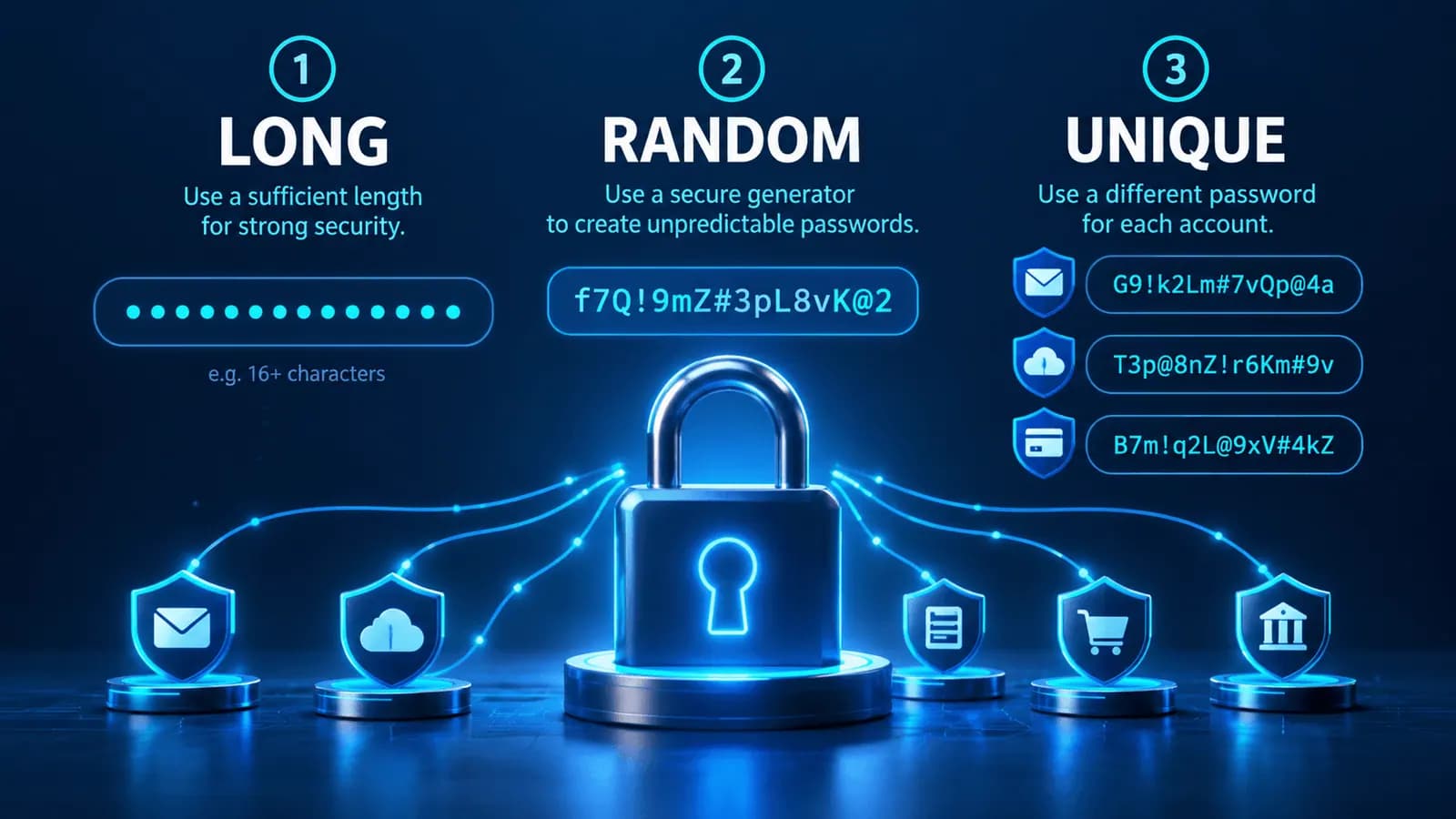
A strong password has three important characteristics: it is long, unpredictable, and unique.
Password strength is not simply about adding an uppercase letter or an exclamation mark. It is about making the secret difficult to guess, avoiding previously exposed credentials, and preventing one compromised account from putting other accounts at risk.
1. Length
For everyday use, a randomly generated password of at least 16 characters is a practical starting point.
The current NIST SP 800-63B standard requires covered systems to enforce a minimum of 15 characters when a password serves as the only authentication factor. A minimum of eight characters is permitted when a password is used as part of multifactor authentication.
Those are system requirements, not a guarantee that a password of a particular length cannot be compromised.
For a detailed comparison, see our planned article How Long Should a Password Be?.
2. Unpredictability
A randomly generated password is much harder to predict than one built from familiar phrases or personal details.
For example, Football2026! combines a word, a year, and a symbol. It may satisfy some websites' older complexity requirements, but it follows a recognizable pattern.
Attackers can try common words, years, substitutions, and leaked passwords without checking every possible combination.
3. Uniqueness
Every important account should use a different password.
If you reuse the same credential, a breach at one website could expose other accounts to credential stuffing: an attack in which stolen username-password combinations are tried against different services.

How to Create a Strong Password in 7 Steps
The simplest approach is to let a trustworthy password generator create an unpredictable credential and then store it securely.
Step 1: Choose a Secure Password Length
Start with at least 16 characters whenever the account supports that length.
Longer randomly generated passwords increase the number of possible combinations, assuming the characters are selected independently and uniformly.
For important accounts such as your primary email or administrative services, 20 or more characters may be a convenient additional precaution when supported by the website.
A password manager makes using these longer credentials relatively easy because you don't need to memorize each one.
What if a Website Has a Short Password Limit?
Follow its technical requirements, choose the longest suitable random password it accepts, and enable MFA if available.
A service that restricts passwords to unusually short lengths deserves additional caution. Never assume that meeting a site's minimum automatically provides adequate security.
Step 2: Use a Cryptographically Secure Password Generator
Humans are generally poor at producing truly unpredictable character sequences.
A well-designed password generator uses cryptographically secure randomness to select characters. For browser-based applications, the Web Crypto API provides cryptographically strong random values.
Visit PasswordGenerating.com to create a random password.
The website states that generation takes place locally in your browser using the Web Crypto API and that generated passwords are not sent to its servers.
This is a useful privacy design, although independent implementation review is still necessary before making audited security guarantees.
Step 3: Choose the Character Types Accepted by the Website
Many password generators allow you to choose from uppercase letters, lowercase letters, numbers, and symbols.
Using a larger collection of available characters can increase the theoretical search space when characters are selected uniformly.
However, forcing particular combinations is not essential to strong passwords.
The current NIST standard prohibits covered password verifiers from imposing composition rules such as mandatory uppercase letters, numbers, or symbols.
Use the supported character types that work with your destination website, and prioritize a secure random generation process.
Should You Always Include Symbols?
Not necessarily.
A sufficiently long and truly random password can be strong without symbols. If the website accepts symbols, you can include them as additional possible characters.
Avoid adding predictable symbols to a familiar word and assuming that makes the result secure.
Step 4: Generate a New Password for Every Account
Never reuse a password simply because it appears strong.
Imagine you use the same 20-character password for a shopping account, an email account, and a social media profile.
If one service exposes the credential and your email address, attackers may try that combination on the other services.
The solution is straightforward: generate an entirely new random credential for every account.
This keeps security failures more isolated and reduces exposure to credential stuffing.
Step 5: Save Your Password in a Reputable Password Manager
A password manager helps generate, store, and autofill unique credentials.
Instead of remembering dozens of complicated passwords, you typically protect a vault with a strong master password or another supported authentication method.
When selecting a password manager, look for clear security documentation, trustworthy account recovery controls, and support for MFA or passkeys where available.
Avoid storing credentials in unprotected spreadsheets, public notes, or screenshots.
What About the Master Password?
Your password manager's master password deserves special care.
A long, randomly generated passphrase made from several independent words can be easier to remember and type than a random string of symbols.
Follow your chosen provider's guidance and protect any recovery information.
Step 6: Enable Multifactor Authentication or Passkeys
A strong password is only one layer of security.
An attacker may gain access through phishing, malware, or stolen sessions without needing to guess your password.
MFA adds an additional authentication step. Where available, phishing-resistant options such as passkeys and appropriately implemented security keys offer advantages over passwords alone.
Enable the strongest authentication method your account supports.
Step 7: Protect, Review, and Replace Passwords When Necessary
A strong password should remain private and trustworthy after creation.
Be careful with unexpected login links, emails requesting credentials, and unfamiliar websites.
Change a password when you discover evidence of compromise, accidentally expose it, or suspect unauthorized access.
Modern NIST guidance does not recommend arbitrary periodic password changes without a security reason.
You should also review account recovery information and remove access from devices or sessions you do not recognize.

Strong Password Examples: What Works and What Doesn't?
Understanding the difference between predictable and randomly generated credentials helps explain why automated generation is useful.
| Example | Problem or advantage |
|---|---|
password123 | Extremely common and predictable |
MyDogName2026! | Personal information and a recognizable pattern |
Qwerty!2026 | Keyboard sequence and predictable substitutions |
T7!mQ2#vR9@pL4$x | Illustrative random-looking format |
| Several independently randomly selected unrelated words | Can form a memorable passphrase |
Important: These are published examples and must never be used as actual account passwords. A string that looks random is not automatically secure; the selection process matters.
Why Random-Looking Passwords Are Not Always Random
A person can create a sequence of letters, digits, and symbols that appears unpredictable while unconsciously following a pattern.
A trustworthy generator avoids reliance on human intuition by using a cryptographically secure random source.
This is why the generation method matters as much as the final appearance.
Can You Create a Strong Password You Can Remember?
Yes, but choosing the words yourself can introduce predictable patterns.
A better approach for a memorized secret is to generate a passphrase from several independently selected words using a suitable wordlist and secure random selection.
For example, five to seven randomly chosen unrelated words can be a useful starting approach, depending on the wordlist and the provider's authentication requirements.
The words should not form a familiar quotation, personal story, song lyric, or common expression.

Common Mistakes That Make Passwords Weaker
Using Personal Information
Avoid names, birth dates, phone numbers, favorite teams, addresses, and other information that can be learned from public profiles or past breaches.
Replacing Letters With Predictable Symbols
Replacing a with @ or o with 0 does not make a familiar password equivalent to one generated randomly.
Attackers can account for common substitutions.
Reusing the Same Password
Password reuse connects accounts that should otherwise be independent.
A unique password for each service limits the damage of an individual credential exposure.
Trusting a Password Strength Label Too Much
A website may display labels such as Weak, Strong, or Very Strong.
These labels are estimates that depend on the evaluation method and its assumptions.
A strength indicator does not prove a password is unknown to attackers, safe from phishing, or protected from theft.
Sharing Passwords Through Messages or Screenshots
Avoid sending credentials through ordinary chat conversations or attaching them to emails.
If an organization requires secure credential sharing, use an approved mechanism designed for that purpose.
Are Online Password Generators Safe?
A well-designed online password generator can be useful, but the security depends on how it works.
Important questions include whether the generator uses cryptographically secure randomness, whether passwords are transmitted to a server, whether the page is delivered securely, and whether scripts are trustworthy.
PasswordGenerating.com describes its generator as browser-local and based on the Web Crypto API.
That approach can reduce unnecessary transmission of generated passwords, but it does not eliminate every possible browser, device, extension, or website-security risk.
For highly sensitive credentials, follow your organization's approved password-generation and storage procedures.
Our planned article Are Online Password Generators Safe? will explore these security considerations in greater detail.
Strong Password Checklist
Before using your newly generated password, verify the following:
- It is long enough for the service and ideally contains at least 16 randomly selected characters.
- It was generated using a trustworthy random process.
- It is not reused on another account.
- It is stored securely.
- Multifactor authentication or a passkey is enabled when available.
- It has not been knowingly exposed or compromised.
- Your account recovery methods are current.

Final Thoughts: The Easiest Way to Create a Strong Password
Strong passwords do not need to be difficult to manage.
For most accounts, generate a unique, random password of at least 16 characters, save it with a trustworthy password manager, and enable additional authentication.
Avoid predictable patterns, password reuse, and unnecessary exposure of credentials.
When you need another password, use the free password generator at PasswordGenerating.com to create a fresh credential.
A secure password is not an absolute guarantee, but combining good generation practices with modern account protection significantly improves your security posture.
Frequently Asked Questions
How do I create a strong password?
Use a cryptographically secure password generator to create a long, unpredictable password. Make it unique to one account, save it in a reputable password manager, and enable MFA.
What is a good example of a strong password?
A strong password can contain 16 or more independently and randomly generated characters. Do not use password examples from public articles, even if they appear complex.
How long should a strong password be in 2026?
For everyday use, 16 or more randomly generated characters is a practical recommendation. Current NIST guidance sets a 15-character minimum for single-factor passwords within its scope.
Do strong passwords need special characters?
Not necessarily. Long, randomly generated passwords can provide strong guessing resistance without symbols. NIST does not require mandatory character-type composition rules.
Can I create a strong password without a generator?
You can use a securely generated multiword passphrase or another trustworthy method, but manually inventing a supposedly random sequence often introduces predictable patterns.
Should I use the same strong password on multiple websites?
No. Every account should have its own unique password to reduce credential-stuffing risks after a breach.
Are online password generators safe?
They can be, provided they are correctly implemented and use cryptographically secure randomness. Browser-local generation is a useful design choice, but the overall website, browser, and device must also be trustworthy.
Should I change my password every three months?
Routine password changes without evidence of compromise are not recommended by current NIST guidance. Change a password when compromised or when another legitimate security concern arises.